GPT-5.6 Prompt Templates for Character Consistency in AI Videos
Character consistency is one of the hardest problems in AI video generation. A character may look correct in the first frame, then slowly change during motion. The face becomes different. The hairstyle shifts. The outfit changes. Body proportions drift. The art style becomes more realistic or more cartoonish. Across multiple shots, the same character may start to look like several different people.
GPT-5.6 cannot directly generate the final AI video unless it is connected to a video generation system. OpenAI describes GPT-5.6 as a model family for advanced professional and technical work, not as a dedicated text-to-video model. During the limited preview, the family is available through the OpenAI API and Codex for selected partners and organizations, and it is not available in ChatGPT during the preview.
However, GPT-5.6 can help creators write better character consistency prompts. It can create identity blocks, negative constraints, shot-by-shot consistency rules, image-to-video instructions, and prompt revisions. In other words, GPT-5.6 can help prepare the instructions that video models need in order to preserve a character.
The key is to describe the character as a stable design system, not as a loose vibe.
Why Character Consistency Fails
Character consistency fails when a prompt does not define what must stay fixed. Many prompts say something like “a cute anime girl running through a city” or “a young man in a blue hoodie talking to camera.” These descriptions are too generic. The model has room to reinterpret the face, outfit, age, body shape, and style in every frame.
Consistency also fails when the prompt asks for too much movement. Fast turns, complex gestures, fighting, dancing, crowd movement, changing camera angles, and long-duration shots all increase the chance of identity drift. AI video models often handle simple motion better than complex action.
The third cause is inconsistent prompt wording. If a creator describes the same character differently in each shot, the model may treat them as different characters. One prompt says “teen anime boy in a blue hoodie,” another says “young male streamer with black hair,” and another says “casual student in a jacket.” These may refer to the same character in the creator’s mind, but they are not identical instructions.
The solution is to create a reusable character identity block and use it across every shot.
Template 1: Character Identity Block
Use this prompt with GPT-5.6 to create a reusable identity block.
Prompt:
“Create a character consistency block for this AI video character. The block should describe fixed visual traits that must stay the same across all shots: face shape, eyes, hairstyle, hair color, outfit, accessories, body proportions, color palette, art style, and details that must not change. Keep the wording specific and reusable: [character description].”
Output format:
“Character consistency block:
Use the same character in every shot. Preserve [face shape], [eye shape and color], [hairstyle], [hair color], [outfit], [accessories], [body proportions], [skin tone or visual design], [color palette], and [art style]. Do not change the face, age, hairstyle, outfit, body proportions, or visual style.”
Example:
“Use the same anime courier in every shot. Preserve her round face, amber eyes, short black bob haircut, yellow rain jacket with a small red badge, black shorts, white sneakers, compact body proportions, and clean cel-shaded anime style. Do not change her face, age, hairstyle, outfit, body proportions, color palette, or art style.”
This block should appear in every prompt where the character is visible.
Template 2: Image-to-Video Character Prompt
Image-to-video is often better for consistency because the model has a visual reference. GPT-5.6 can help write prompts that protect the reference image.
Prompt:
“Write an image-to-video prompt for this character reference. The goal is to add subtle motion while preserving identity. Include character preservation, camera movement, lighting, action, style, and negative constraints: [character description or image description].”
Output structure:
“Animate the reference character into a [format] video. Preserve the exact face, eye shape, hairstyle, hair color, outfit, accessories, body proportions, color palette, and art style from the reference image. Add [specific simple motion]. Camera: [movement]. Lighting: [style]. Do not change the character’s face, age, hairstyle, outfit, body shape, or visual style.”
Example:
“Animate the reference anime courier into a vertical 9:16 video. Preserve her round face, amber eyes, short black bob haircut, yellow rain jacket, red badge, black shorts, white sneakers, compact proportions, and clean cel-shaded anime style. She looks down at a glowing package and blinks softly. Camera slowly pushes in from a medium shot. Rainy neon lighting reflects on the street. Do not change her face, age, hairstyle, outfit, body proportions, or art style.”
This type of prompt works best with controlled motion.
Template 3: Multi-Shot Character Consistency
Multi-shot scenes create more risk because every shot gives the model another chance to reinterpret the character. GPT-5.6 can help build consistent prompts across the entire sequence.
Prompt:
“Create a 6-shot AI video plan using the same character. Each shot should include action, camera, setting, duration, and the same character consistency block. Keep the character identity wording identical across all shots: [character block and story idea].”
Example output:
Shot 1: Wide shot, rainy alley, character enters frame.
Shot 2: Medium shot, character stops under streetlight.
Shot 3: Close-up, character looks at glowing package.
Shot 4: Reaction close-up, eyes widen.
Shot 5: Over-the-shoulder shot, shadows appear.
Shot 6: Final shot, package opens with blue light.
Each shot repeats the same identity block. This may feel repetitive, but repetition helps. AI video generation benefits from consistent instructions.
Template 4: Anime Character Consistency
Anime character consistency requires special care because anime designs rely on stylized proportions, simplified facial features, and controlled color palettes. If the prompt pushes too hard toward realism, the character may drift.
Prompt:
“Rewrite this AI video prompt to preserve anime character consistency. Keep the character in the same anime art style and prevent photorealism, 3D realism, face drift, hairstyle changes, outfit changes, and body proportion changes: [prompt].”
Improved prompt structure:
“Use the same anime character from the reference. Preserve the exact face shape, eye design, hairstyle, outfit, body proportions, flat color palette, clean line art, and cel-shaded anime style. Use subtle anime-style motion. Do not make the character photorealistic, 3D, overly detailed, older, younger, or redesigned.”
This is important because many AI video outputs unintentionally become semi-realistic during motion. For anime, consistency includes staying anime.
Template 5: Product Mascot or Brand Character
Brand mascots need even stricter consistency because they may represent a business, product, or campaign.
Prompt:
“Create a brand character consistency prompt for this mascot. The prompt should preserve shape, silhouette, colors, logo placement, facial features, proportions, expression style, and brand-safe appearance across video shots: [mascot description].”
Example:
“Use the same friendly robot mascot in every shot. Preserve its round white body, small blue digital eyes, teal antenna, orange scarf, compact proportions, smooth plastic material, and simple friendly expression. Keep the logo badge on the left side of the chest unchanged. Do not change its shape, colors, logo placement, facial display, proportions, or brand style.”
For mascot videos, identity is often tied to silhouette and color. GPT-5.6 can help identify which design traits must never change.
Template 6: Dialogue Scene Consistency
Dialogue scenes are difficult because talking faces can drift. Lip movement, expressions, and head turns can change identity. GPT-5.6 can help simplify dialogue shots.
Prompt:
“Rewrite this dialogue scene into AI-video-friendly shots that preserve character consistency. Use separate close-ups and reaction shots instead of one complex continuous shot. Include identity blocks for each character: [dialogue scene].”
Better structure:
Shot 1: Character A listens.
Shot 2: Character B speaks.
Shot 3: Close-up of Character A reaction.
Shot 4: Over-the-shoulder shot, both characters visible but minimal motion.
Shot 5: Character B final line.
This is more controllable than asking two characters to speak, gesture, move, and interact continuously in one shot.
Template 7: Negative Prompt for Character Consistency
A negative prompt does not guarantee success, but it helps define what should not happen.
Prompt:
“Create a negative prompt block for preserving character consistency in AI video. Focus on preventing face drift, outfit changes, hairstyle changes, age changes, body proportion changes, style changes, extra limbs, distorted hands, and inconsistent colors.”
Example:
“Negative constraints: no face drift, no changing facial features, no hairstyle changes, no outfit changes, no age changes, no body proportion changes, no art style shift, no photorealism, no 3D redesign, no extra limbs, no distorted hands, no inconsistent colors, no random accessories, no changed eye color, no altered silhouette.”
Use this after the main prompt, not instead of it. The positive identity block is still more important.
Template 8: Prompt Debugging for Identity Drift
When a generated video fails, GPT-5.6 can diagnose the prompt.
Prompt:
“The generated AI video had character identity drift. Here is the original prompt: [prompt]. The character changed in these ways: [describe failure]. Diagnose why the prompt may have failed and rewrite it to better preserve identity.”
GPT-5.6 may identify issues such as:
the character description was too generic
the shot asked for too much movement
the prompt changed style language
the camera movement was too complex
the character was not anchored to a reference
the negative constraints were missing
the shot duration was too long
This diagnosis helps creators improve instead of randomly retrying.
Template 9: Consistency Checklist
Before generating, use GPT-5.6 as a final reviewer.
Prompt:
“Review this AI video prompt for character consistency. Check whether it protects face, eyes, hairstyle, outfit, body proportions, art style, colors, accessories, camera complexity, motion complexity, and negative constraints. Then provide a revised version: [prompt].”
This checklist is useful because creators often focus on the scene and forget the identity details. A reviewer prompt forces the system to inspect consistency before generation.
Template 10: Full Character Consistency Workflow
For serious projects, use GPT-5.6 to build a full workflow.
Prompt:
“Create a character consistency workflow for this AI video project. Include character bible, reference image rules, reusable identity block, shot list, prompt structure, negative prompt block, review checklist, and regeneration strategy: [project description].”
This is especially useful for recurring characters, anime series, virtual influencers, comic adaptations, product mascots, and multi-scene short films.
Which GPT-5.6 Model Should You Use?
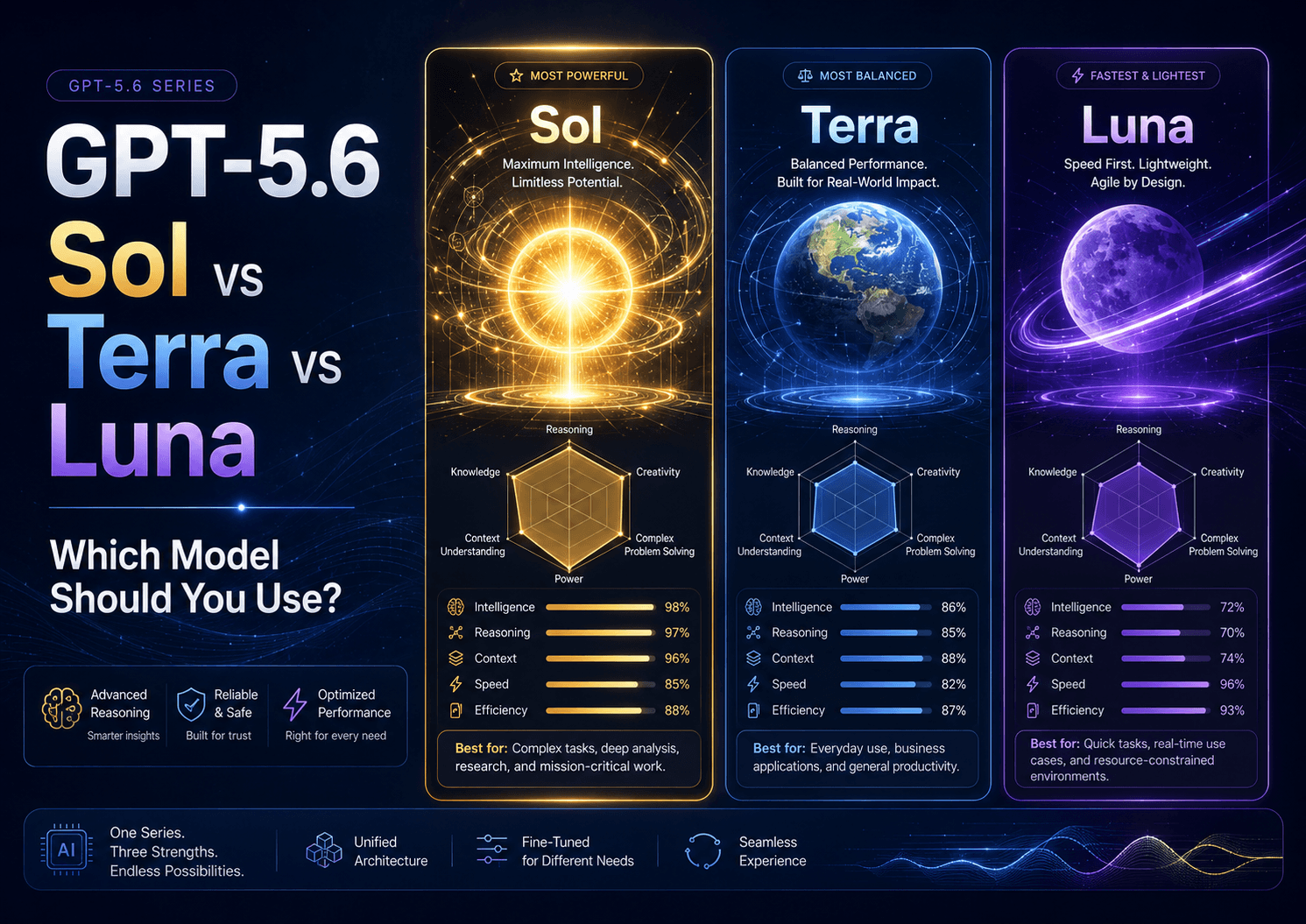
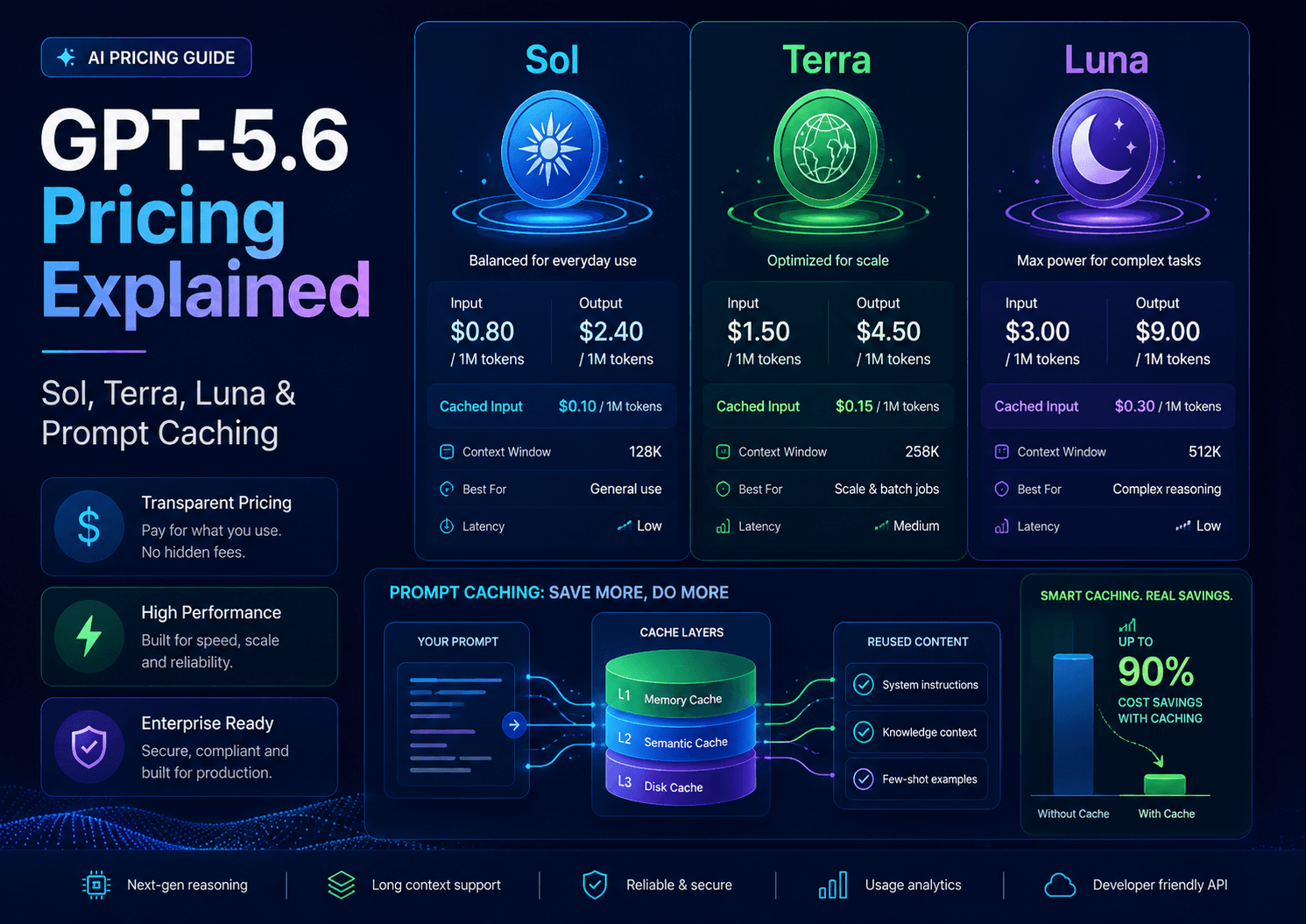
OpenAI describes GPT-5.6 Sol as the most capable model, Terra as a strong lower-cost option, and Luna as the fastest and most cost-efficient option.
For character consistency work, Sol is best for complex character systems, multi-scene analysis, prompt debugging, and final review. Terra is useful for everyday prompt writing and shot-list planning. Luna is useful for quick variations, captions, and lightweight prompt rewrites.
If the character is important to the project, use the strongest planning process you can. Character drift is one of the most common reasons AI videos become unusable.
Final Thoughts
Character consistency in AI video starts before generation. It starts with the prompt, the reference image, the shot structure, and the consistency rules. GPT-5.6 can help creators build those rules more carefully.
Use GPT-5.6 to create character identity blocks, image-to-video prompts, multi-shot plans, negative constraints, debugging prompts, and review checklists. Keep the wording consistent. Keep motion controlled. Protect the character’s face, outfit, body proportions, and art style in every shot.
The stronger the character system, the more stable the AI video will be.